The best diagram tools for Notion, by use case (2026)
Updated: 2026-05-22 · Eight tools compared on price, Notion-native experience, and what they actually do well.
Pick a diagramming tool for Notion and you are really picking between three mental models: native code blocks (Notion's Mermaid, Flowchart Generator's database), in-page editable images via a Chrome extension (Flowblock, or the JGraph draw.io extension), and separate canvases you embed via iframe (Whimsical, Miro, Lucidchart, and the free standalone options Excalidraw and draw.io). Each model is right for a different job. This roundup ranks the eight tools below honestly, then maps them to the use cases people actually shop for: flowcharts, wireframes, architecture, mind maps, and team whiteboarding.
Quick verdict
After working through the top Notion diagram tools on the market, here is where we land. For most Notion users: use the native Mermaid block for throwaway diagrams, and Flowblock when you need to edit those Mermaid blocks visually or sketch from scratch on the same page.
For team workshops and live whiteboarding: Whimsical (cleaner, cheaper) or Miro (broader, more expensive). Both embed; neither saves into Notion as a native block.
For industrial diagramming (BPMN, UML, AWS architecture with team libraries): Lucidchart, or Flowblock's draw.io editor if you do not need SSO and shared team shape libraries (the two things Lucidchart's paid plans buy that Flowblock does not match).
 Try free
What to look for in a Notion diagram tool
The features people search for when comparing diagram apps for Notion (shape libraries, real-time collab, AI generation) are easy to line up on a feature matrix. The features that actually decide whether a tool is right for you sit underneath them. In our testing, five questions tell you the most:
- Does the diagram live inside the Notion page, or on someone else's server? An iframe embed loads a viewer pointed at the tool's cloud. A native image block lives in your Notion workspace and stays there if you uninstall the tool. The difference matters for ownership, search, exports, and what happens when you cancel the service.
- Is it editable later, or only at creation time? Mermaid code is editable as text, not as a canvas. A static PNG you exported from a separate tool is not editable at all. Most diagrams change more than they get created; the maintenance flow is what dominates cost over time.
- What diagram types does it actually cover? Flowcharts are universal. ER diagrams, UML, BPMN, AWS architecture, mind maps, wireframes: each tool covers a different subset cleanly. Mismatches mean fighting the tool.
- What does it cost at your real usage? The free tier marketing is rarely the price you end up paying. Active users mostly land on $5 to $15 per month per editor.
- Does it integrate with Notion AI's Mermaid output? If you use Notion AI to draft diagrams, only one tool currently takes the Mermaid block it generates and turns it into an editable visual canvas in place. That's Flowblock.
These five questions decide which is the best diagram tool for Notion for any given workflow. We ranked the eight pieces of Notion diagram software below against them, with honest notes on where each genuinely wins.
1. Flowblock
Chrome extension · Excalidraw + draw.io · native Notion image blocks
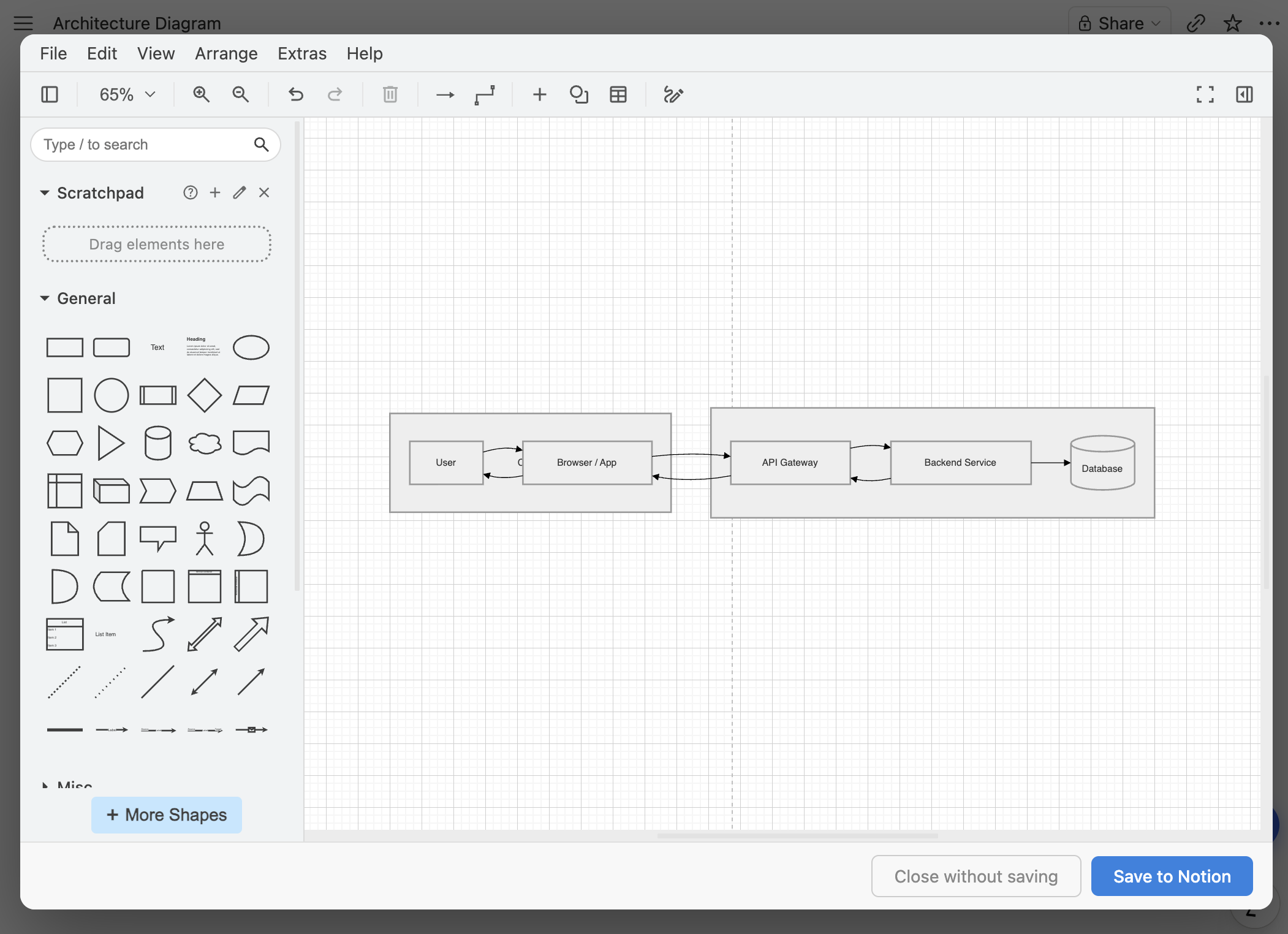
Flowblock is a Chrome extension that adds a floating button to every Notion page. Click it and a modal opens with either Excalidraw (hand-drawn, sketch-style) or draw.io (rigorous, full shape libraries). Draw, click save, and the diagram lands in the Notion page as a native image block: editable forever by reopening it, owned by you, untouched if you uninstall Flowblock.
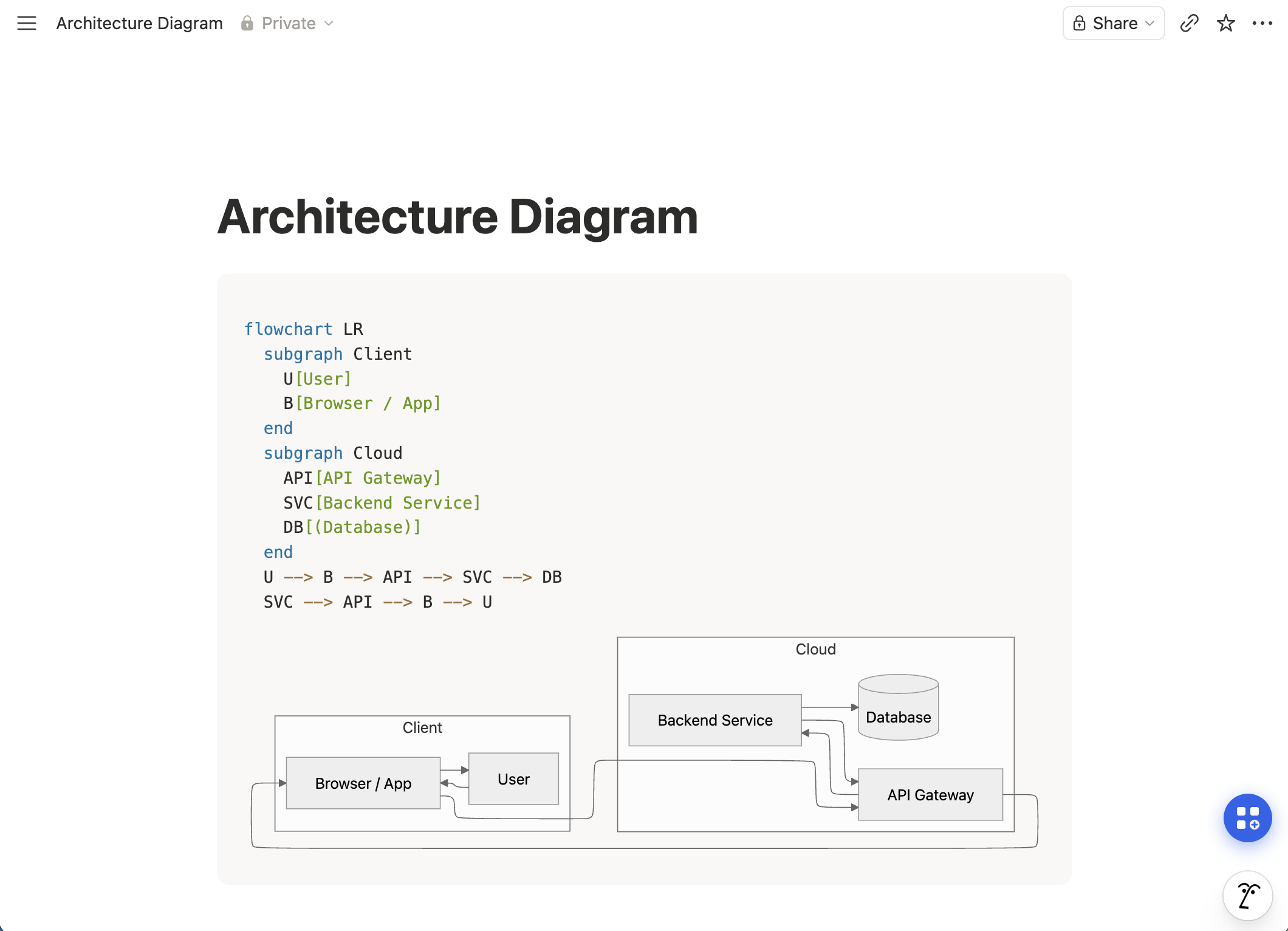
The differentiator, and the part we lean on most, is the Mermaid import path. When Notion AI gives you a Mermaid block, Flowblock detects it, adds an Import button, and one click converts the source into an editable Excalidraw or draw.io diagram. That's the only tool in this roundup that takes a Notion AI Mermaid block and makes it visually editable in place.
- Wins on
- Diagrams that live inside Notion. Notion AI Mermaid editing. Free tier for occasional use. Zero context switch.
- Loses on
- Real-time collaboration (Flowblock is single-author by design).
- Pick if
- Your work lives in Notion and you want the best diagram tool for Notion to keep editing on the page itself, not in an iframe pointed at a separate canvas.
Try Flowblock - free
2. draw.io extension for Notion
Chrome extension · draw.io only · DOM-hacked block insertion
The "draw.io for Notion" Chrome extension is the closest direct competitor to Flowblock for the in-Notion editing use case. It adds a draw.io editor inside Notion and inserts the saved diagram into the page. The approach is the right shape, the canvas is the real draw.io, and it costs nothing. Two trade-offs are worth knowing about before you commit.
Reliability is the main concern we ran into. The extension currently averages a 3-star rating on the Chrome Web Store, and it does not integrate with Notion via the official API; it pushes the diagram in by manipulating the page DOM. That works today, but each Notion update is a chance for the extension to break.
Smaller weaknesses: no one-click Mermaid import from Notion AI blocks, no version history with rollback, and no Excalidraw option (draw.io is the only canvas).
- Wins on
- Free. Single-purpose, focused on draw.io. Familiar to existing draw.io users.
- Loses on
- 3-star reliability track record. Fragile across Notion updates. No one-click Notion AI Mermaid import. No version history. draw.io only, no Excalidraw.
- Pick if
- You only want draw.io, do not need Mermaid import or version history, and are comfortable monitoring whether the extension still works after Notion ships changes.
3. Flowchart Generator
Template · database-driven Mermaid · in-Notion code block
The Flowchart Generator is a template that builds Mermaid syntax from a Notion database. You fill in nodes and edges as rows in a table, and a formula property emits the corresponding Mermaid code, which Notion then renders. The mental model is database-as-source-of-truth.
Strengths: the database doubles as a single source of truth, so updating one row updates the diagram. Cheap. Lives entirely inside Notion with no external service. Weaknesses: you do not edit visually. Customisation beyond the structured fields is awkward. Diagram types are flowchart-only. If you want a flowchart you can edit visually rather than via rows, see the three ways to add a flowchart in Notion, or the head-to-head comparison against Flowblock.
- Wins on
- Process diagrams where the data already lives in a Notion database. One-time price.
- Loses on
- Visual editing. Anything beyond flowcharts. Customisation per diagram.
- Pick if
- You think relationally and your processes already live as Notion database rows.
Note: as of 2026-06-05, the Flowchart Generator is still listed as out of stock on its product page. Status may change.
4. Notion's native Mermaid code block
Built-in · code-only · no visual editor
Notion's /code block has Mermaid as a language option. Paste Mermaid syntax and Notion renders it as a static image. Notion AI uses this format by default when you ask it for a flowchart. The render is fast, the source travels with the page, and there's nothing extra to install.
The catch: the render is read-only as a visual. To change anything, you edit the Mermaid source directly: open the block, edit the code, and Notion re-renders on save. That works fine if you are comfortable with the syntax and the change is small (renaming a node, swapping an arrow). Beyond that, the friction stacks up: moving a node 50 pixels, recolouring one arrow, or laying nodes out in a new order all map clumsily to text edits, and non-technical teammates are not going to be the ones doing it. We've found that most Flowblock users land here first, hit that wall, and then look for a way to make the rendered diagram editable as a canvas.
- Wins on
- Cost (free, native). Speed for one-shot diagrams. Source travels with the page.
- Loses on
- Any visual editing. Maintenance flow. Notion AI follow-up edits.
- Pick if
- You write Mermaid by hand and your diagrams genuinely do not change after creation.
5. Excalidraw
Standalone canvas · embed via Notion iframe · the engine Flowblock uses
Excalidraw is the open-source hand-drawn-aesthetic canvas Flowblock embeds as one of its two editors. Used standalone, you create a drawing at excalidraw.com, share-link it, and paste the URL into a Notion embed block. Notion renders an iframe of the Excalidraw canvas inline.
The save model is the catch. The iframe behaves like a live editor, but edits only persist if you remember to save inside Excalidraw's own UI first. Navigate away without doing that, and the Notion page reloads the original version with your in-iframe changes gone.
Smaller weaknesses: no one-click Mermaid import from a Notion AI block, and no version history with rollback.
- Wins on
- Free. Same canvas Flowblock uses, so you can try the editor before installing anything. Nothing to manage.
- Loses on
- The "edit in iframe but save in external UI" footgun. No one-click Notion AI Mermaid import. No version history. The diagram lives on excalidraw.com, not in Notion.
- Pick if
- You want a one-off sketch in a Notion page and do not plan to keep iterating on it.
6. Whimsical
Separate canvas · embed in Notion · flowcharts, wireframes, mind maps
Whimsical is a separate web app for flowcharts, wireframes, mind maps, and sticky notes, with a clean UX and good real-time collab. Notion embeds Whimsical boards via an iframe, so the diagram is editable from the Notion page but lives on Whimsical's servers. They added AI flowchart generation in late 2024 and it is competitive.
Wireframes are Whimsical's real win. The wireframe library is mature, the components feel like UI primitives instead of abstract shapes, and the output is polished. Mind maps are similarly solid. Where it loses for Notion-native workflows: the iframe model means the diagram is not Notion content, the free tier (3 boards) is restrictive, and per-user pricing scales fast.
- Wins on
- Real-time collab. Wireframes. Mind maps. Clean UX. Cross-board organisation.
- Loses on
- Notion-native ownership (it is an iframe, not a block). Free-tier limits. Per-user pricing at scale.
- Pick if
- You need real-time collab and wireframing is a primary use case.
7. Miro
Infinite canvas · whiteboard-first · embed in Notion
Miro is the whiteboard-first option in this list. Infinite canvas, sticky notes, video calls, templates library, mobile apps, and a deep integration ecosystem. Diagrams are part of a much larger toolkit aimed at workshops and collaborative sessions. Notion embeds Miro boards the same way it embeds Whimsical.
Miro is overkill for solo Notion users sketching a flow on a doc page, and it gets expensive at team scale. But for a workshop where ten people are co-creating, sticky-note bursts are the primary content, and the diagram is a side-output, Miro wins outright. The diagram-on-a-Notion-page case is genuinely not what Miro is best at.
- Wins on
- Whiteboarding workshops. Sticky notes. Infinite canvas. Mobile apps. Integration breadth.
- Loses on
- Notion-native ownership. Single-user use cases. Price at scale.
- Pick if
- Your team runs synchronous whiteboard workshops and Notion is the place you write up the results, not the place the workshop happens.
8. Lucidchart
Industrial diagramming · shape libraries · embed in Notion
Lucidchart is the professional-grade option. Deep shape libraries for AWS, Azure, GCP, BPMN, UML, ER, network diagrams, swimlanes. Team accounts, audit trails, SSO, admin console. It is the tool a large engineering team picks when "we need to standardise on one diagramming system" comes up.
For small teams and solo Notion users, Lucidchart's price and complexity are usually overkill. Flowblock's draw.io editor covers most of the same shape-library territory (AWS, Azure, BPMN, UML, ER) at zero cost, with the trade-off that you give up SSO and shared team shape libraries. If you are not on a team that needs those two features, the cost difference is large.
- Wins on
- Industrial shape libraries. Enterprise features (SSO, audit, admin). Team-wide shared libraries.
- Loses on
- Cost. Complexity for simple diagrams. Notion-native ownership.
- Pick if
- You need BPMN, UML, or AWS architecture diagrams at a team scale with enterprise compliance.
Comparison table
| Tool | Diagrams live in | Visual editing | Diagram types | Real-time collab | Free tier | Paid from |
|---|---|---|---|---|---|---|
| Flowblock | ✅ Notion image block | ✅ Yes (Excalidraw + draw.io) | ✅ All draw.io types and all Excalidraw types | ❌ No | ✅ 5 drawings/month | $3.75/month |
| draw.io extension | ⚠️ Notion image block (DOM hack) | ✅ Yes (draw.io only) | ✅ All draw.io types: flowchart, BPMN, UML, ER, AWS, network | ❌ No | ✅ Free | — |
| Flowchart Generator | ✅ Notion code block | ❌ No (database fields) | ❌ Flowchart only | Via Notion sharing | ❌ - | $5 one-time |
| Native Mermaid | ✅ Notion code block | ❌ No (source text only) | ⚠️ Mermaid types only (no sketches, custom shapes, or freehand) | Via Notion sharing | ✅ Free | — |
| Excalidraw | ❌ excalidraw.com (iframe) | ⚠️ Yes (with save-in-external-UI footgun) | Sketches, flowcharts, sequence, mindmaps | ✅ Yes (share link) | ✅ Free | — |
| Whimsical | ❌ Whimsical (iframe) | ✅ Yes | Flowchart, wireframe, mindmap, sticky | ✅ Yes | ⚠️ 3 boards | $10/user/month |
| Miro | ❌ Miro (iframe) | ✅ Yes | Whiteboard, flowchart, all types via templates | ✅ Yes | ⚠️ 3 boards | $10/user/month |
| Lucidchart | ❌ Lucidchart (iframe) | ✅ Yes | ✅ Industrial: BPMN, UML, ER, AWS, network | ✅ Yes | ⚠️ 3 documents | $9/user/month |
Picking by use case
The right tool depends on what you are actually diagramming and how often it changes. Across our own Notion diagramming work, the same handful of patterns keep coming up.
If the flowchart starts as Notion AI Mermaid: Flowblock. If it starts as hand-written Mermaid and never changes: native Mermaid block. For a workshop where the team is co-drawing the flow live: Whimsical.
For solo or small-team Notion-first work: Flowblock's draw.io editor (AWS and cloud icon libraries, free). For team-wide standardisation with enterprise features: Lucidchart. The gap between them is mostly SSO, audit logs, and shared shape libraries, none of which most teams need.
Whimsical wins this one. The wireframe library is mature and the output is polished. Flowblock via Excalidraw is more sketch-style; useful for early-stage idea capture, less useful for stakeholder review. If you need to ship low-fidelity wireframes alongside a PRD in Notion, Whimsical is the better fit.
Whimsical or Flowblock. Whimsical's mind map mode is purpose-built; Flowblock handles it via Excalidraw or draw.io with general-purpose shapes. For a quick mind map embedded in a Notion brainstorm doc, Flowblock keeps it in the page.
Miro or Whimsical, depending on culture. Miro for sticky-note heavy, infinite-canvas workshops with video calls. Whimsical for cleaner, more structured collaborative sessions. Neither lives in Notion; both embed as iframes if you want to surface the board from a doc page.
Lucidchart for enterprise teams. Flowblock's draw.io editor for everyone else: same shape libraries, no cost, lives in Notion. The trade-off is the enterprise admin layer.
Flowblock is the only option in this roundup that takes a Notion AI Mermaid block and turns it into an editable visual canvas inside the page. The other tools either do not read Notion's Mermaid blocks, or they live outside Notion entirely. For the long version of how this works, see our Mermaid to flowchart guide.
FAQ
Which Notion diagram tool is free?
Five of the eight options have a usable free tier. Notion's built-in Mermaid block is free for everyone on any Notion plan. The JGraph draw.io extension is free, with the reliability caveats called out in section 2. Standalone Excalidraw (and draw.io embedded directly via iframe) is free, with the in-iframe save-discard issue called out in section 5. Flowblock is free for the first 5 drawings per month, then $3.75 to $4.99 per month for unlimited; the monthly cap is on new drawings only, so existing diagrams stay editable as often as you want. Whimsical's free tier covers up to 3 boards. Miro and Lucidchart have free tiers too, but they cap edits and collaborators tightly enough that real work pushes you to a paid plan within a week. The Flowchart Generator is a one-time $5 purchase.
Which tool keeps diagrams inside Notion vs embedding from elsewhere?
Three approaches. Native code blocks (Notion's Mermaid, Flowchart Generator's database) live entirely inside Notion as code or rendered images. Flowblock saves the diagram as a real Notion image block, so it lives where the rest of your content lives. Whimsical, Miro, and Lucidchart are separate applications that you embed via an iframe link, which means the actual diagram lives on their servers and Notion shows a pointer to it. Standalone Excalidraw and draw.io fit this same iframe-embed model if used without Flowblock, with the trade-off that the diagram lives on excalidraw.com or app.diagrams.net rather than inside Notion's storage.
Can I edit Notion AI Mermaid diagrams with these tools?
Only Flowblock (and draw.io, which Flowblock embeds) can take a Notion AI Mermaid block and turn it into an editable visual diagram inside Notion. The native Mermaid block keeps the source as code, which is editable as text but not as a draggable canvas. Whimsical, Miro, and Lucidchart do not read Notion's Mermaid blocks. The Flowchart Generator generates Mermaid from databases, so it goes the opposite direction.
Which tool is best for a one-person founder vs a 20-person team?
For a one-person founder writing docs and PRDs in Notion: Flowblock or the native Mermaid block. Neither costs much, both keep diagrams in your pages. For a 20-person team doing live whiteboarding workshops and real-time co-editing: Whimsical or Miro. Lucidchart fits teams that need industrial diagramming (BPMN, UML, AWS architecture) with shared shape libraries. Hybrid setups are common: Flowblock for the in-Notion stuff, Whimsical or Miro for the workshop boards.
Why is Notion's built-in Mermaid not enough?
Notion's Mermaid block is great at rendering. It is not editable as a visual canvas. To change a node's position, recolour a single arrow, or add a freehand annotation, you have to rewrite the source code and re-render. For one-off diagrams that never change, that is fine. For diagrams that get updated every few weeks as the underlying system evolves, the round-trip back to source code is the friction Flowblock removes.
Looking for setup, editor, or billing details? See the detailed FAQ →
Want Notion-native editable diagrams?
If your work lives in Notion, the best diagram tool for Notion is the one that doesn't take it elsewhere. Flowblock turns Notion AI's Mermaid blocks into real Excalidraw or draw.io diagrams, saved back as native image blocks on the same page.
Try Flowblock - free