Notion VIP Flowchart Generator vs Flowblock: which Notion flowchart tool fits you
Updated: 2026-06-05 · Database-driven Mermaid vs a visual canvas, compared honestly.
These are the two purpose-built tools for making a flowchart in Notion, and they could hardly be more different. Notion VIP's Flowchart Generator is a $5 template that turns database rows into Mermaid code. Flowblock is a Chrome extension that opens a real drawing canvas inside the page. We make one of them, so read accordingly, but the honest summary is that this is not a better-or-worse question. The two tools encode opposite mental models of what a flowchart is, and which one fits you depends on how you think, not on a feature checklist. This page lays out both models, profiles each tool, and ends with a plain when-to-pick-which. For the full field of options beyond these two, see the best diagram tools for Notion roundup.
Quick verdict
Pick by mental model, not by features. If your processes already live as Notion database rows and you think in tables and relations, the Flowchart Generator turns that data into a flowchart for a one-time $5, and editing a row updates the diagram. If you think spatially, want to drag boxes and place arrows by hand, need diagram types beyond flowcharts, or have teammates who will never touch a database formula, Flowblock's visual canvas is the better fit. Both keep the flowchart inside Notion, which already puts them ahead of every embed-an-external-board workaround. One practical caveat as of this writing (June 2026): the Flowchart Generator is listed as out of stock on its product page, so check availability before planning around it.
The two mental models
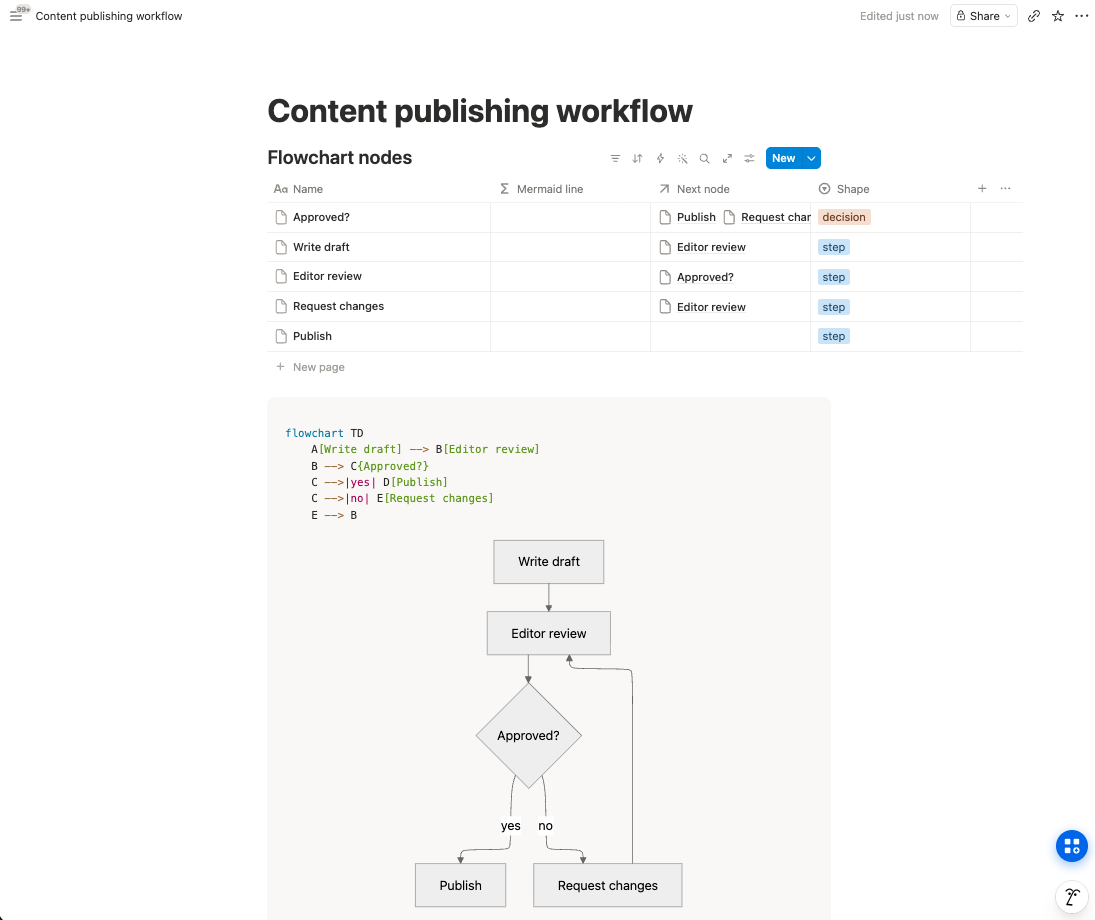
The Flowchart Generator treats the database as the source of truth. A flowchart, in this view, is structured data: a set of steps, each pointing at the next, with styles attached. You never draw anything. You describe the flow as rows, and a formula compiles those rows into Mermaid syntax that Notion renders. The rendered diagram is a view of your data, the way a Kanban board is a view of a task database.
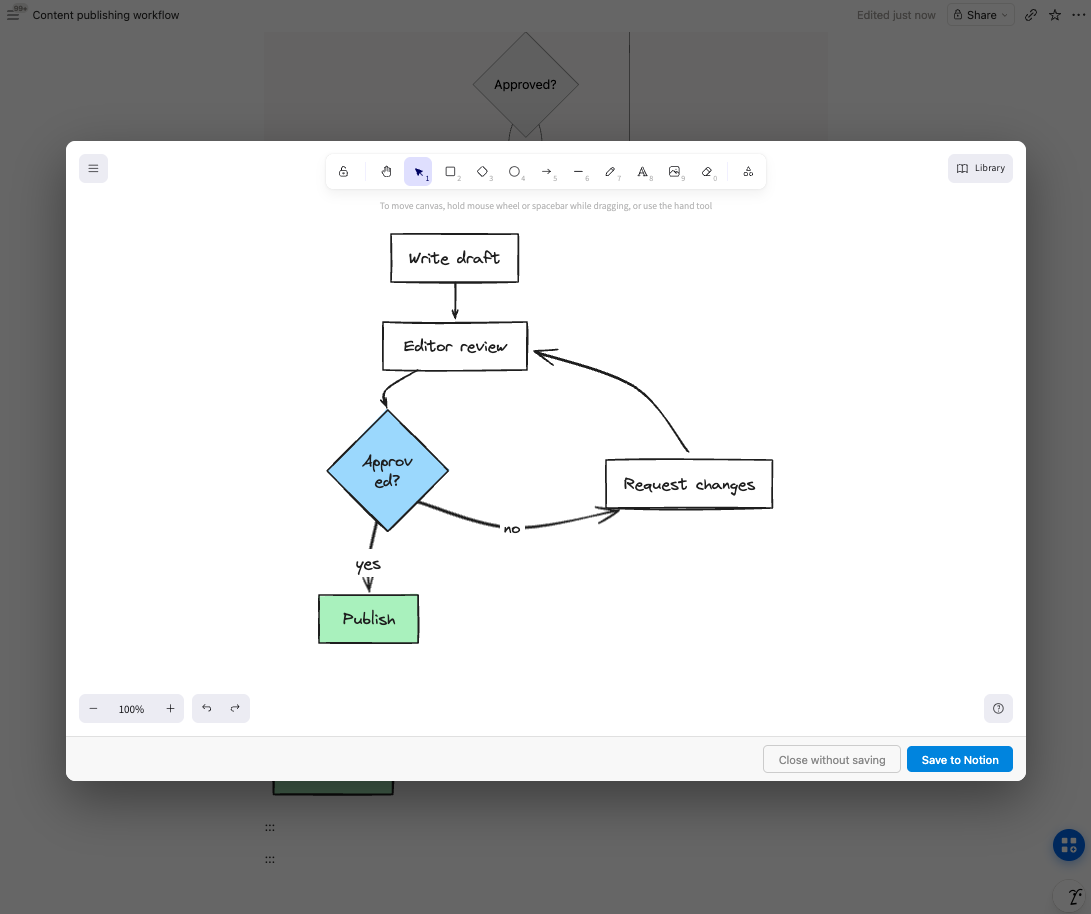
Flowblock treats the canvas as the source of truth. A flowchart is a drawing: boxes you placed, arrows you bent, colours you chose. The extension opens an Excalidraw or draw.io editor in a modal over the Notion page, and saving puts the result into the page as a native image block with the editable scene preserved inside it. Clicking Edit later reopens exactly what you drew.
Neither model is wrong. Database thinking gives you consistency and bulk updates; canvas thinking gives you layout control and zero abstraction between you and the diagram. The friction starts when a person with one mental model is handed the other tool: a spatial thinker forced to express a flowchart as relations, or a data thinker watching a hand-drawn diagram drift out of sync with the table it describes. That mismatch, not any individual feature, is what generates most of the frustrated posts about each tool.
 Try free
Flowchart Generator, up close
The Flowchart Generator is a Notion template by Notion VIP, one of the longest-running Notion resources around, and the audience trust behind it is earned. It ships as a set of linked databases: one for flowcharts, one for nodes (each row holds a "previous node" relation that defines the arrows), and one for styles with HEX colours. Formula properties compile the rows into Mermaid syntax, and Notion's native code block renders the result inside the page. The 2024 update added meaningfully more customisation than the original.
Where it shines: when the process genuinely exists as structured data. An approval chain, a content pipeline, a status workflow. Edit one row and the diagram updates, with perfect consistency and no drawing skills involved. It also needs no installation at all, so it works in every browser and on mobile, and $5 once is as cheap as paid tools get.
Where it strains: you never edit the diagram itself, only the data behind it. Layout is whatever Mermaid's auto-layout decides, customisation stops at the template's structured fields, and the model is flowcharts only. Setting up the databases is real overhead for a flow that does not already live as rows. And the editing surface (database rows plus formulas) is a step more abstract than most non-technical teammates will follow. As of June 2026 it is also listed as out of stock on the product page, which matters if you are deciding this week.
Flowblock, up close
Flowblock is a Chrome extension that adds a drawing button to every Notion page. Click it and a full Excalidraw or draw.io editor opens in a modal; draw the flowchart by hand, hit save, and it lands in the page as a native Notion image block. The editable source is embedded inside the saved image, so the diagram reopens in the same editor, with every box and arrow live, whenever the process changes. It also imports Notion's Mermaid blocks, including the ones Notion AI generates, converting them into an editable canvas in one click (the Mermaid to flowchart guide covers that path in detail).
Where it shines: full visual control over layout, colour, and shape; diagram types well beyond flowcharts (draw.io brings UML, BPMN, ERD, and cloud architecture shape libraries; Excalidraw brings the sketch aesthetic); and an editing surface that any teammate can use, because moving a box needs no syntax and no formulas. It is free for 5 drawings per month, then $3.75 per month.
Where it strains, honestly: it is Chrome-only and desktop-only, so there is no editing from Notion's mobile apps (saved diagrams still display everywhere, since they are ordinary image blocks). It is single-author by design, with no real-time co-editing. And there is no data binding: if your flowchart should mirror a database, nothing updates it automatically; you edit it the way you edit any drawing.
Side-by-side comparison
| Axis | Flowchart Generator (Notion VIP) | Flowblock |
|---|---|---|
| Editing model | ⚠️ Edit database rows; Mermaid regenerates | ✅ Visual canvas (drag, draw, restyle) |
| Output in Notion | ✅ Rendered Mermaid code block | ✅ Native image block with editable source |
| Diagram types | ❌ Flowcharts only | ✅ Flowcharts, UML, BPMN, ERD, architecture, sketches |
| Layout control | ❌ Mermaid auto-layout decides | ✅ Full manual control |
| Customisation | ⚠️ Structured style fields (HEX colours) | ✅ Anything the canvas supports |
| Bulk / data-driven updates | ✅ Edit a row, diagram updates | ❌ Manual edits only, no data binding |
| Price | ✅ $5 one-time (out of stock as of 2026-06) | ⚠️ Free for 5/month, then $3.75/month |
| Learning curve | ⚠️ Database + relations setup first | ✅ Low (drag and drop) |
| Works on mobile / any browser | ✅ Yes, it is just Notion | ❌ Editing needs Chrome on desktop |
| Who can edit it | ⚠️ Anyone comfortable with Notion databases | ✅ Anyone who can drag a box (with the extension) |
Read the table by model and the rows sort themselves: the Flowchart Generator wins wherever structured data is the natural source (bulk updates, one-time price, runs anywhere Notion runs), and Flowblock wins wherever the diagram itself is the thing you care about (layout, customisation, diagram types, who can maintain it). That is the same split the three-ways flowchart guide reaches from the how-to angle.
When to pick the Flowchart Generator
- Your processes already live as Notion databases. If the steps exist as rows today, the generator gives you a diagram view of them for almost nothing, and it stays in sync because the rows are the diagram.
- You think relationally. Some people find "each row points at its previous node" more natural than dragging arrows. If that is you, the database model is a feature, not a workaround.
- You only need flowcharts. No ERDs, no wireframes, no architecture diagrams on the horizon.
- You prefer code blocks as the rendering target. The output is ordinary Mermaid in an ordinary Notion block: no extension on anyone's machine, nothing to maintain, mobile included.
When to pick Flowblock
- You want to draw and drag. If your instinct is to sketch the flow and adjust the layout until it reads right, a database will always feel like translation overhead.
- You need diagrams beyond flowcharts. One tool covering flowcharts, ERDs, UML, BPMN, architecture diagrams, and freehand sketches beats a per-type solution.
- You have Notion AI Mermaid blocks to deal with. Flowblock's Import button turns generated Mermaid into an editable canvas in one click, which no template can do.
- Non-technical teammates maintain the diagram. Moving a box on a canvas needs no explanation. Editing a relation in a formula-driven database does.
And if you are torn: the two tools do not conflict, since one lives in databases and code blocks and the other in image blocks. Trying Flowblock costs nothing for the first 5 drawings a month, and the wider trade-off map (embeds, native Mermaid, image uploads) lives in the Notion diagram guide.
FAQ
Is Notion VIP's Flowchart Generator a Chrome extension like Flowblock?
No. The Flowchart Generator is a Notion template: a set of databases plus formula properties that emit Mermaid code, which Notion's native code block renders. There is nothing to install, and it works in any browser and in Notion's mobile apps. Flowblock is a Chrome extension that opens a visual drawing canvas on top of the page and saves the result back as a native Notion image block. Different delivery, different editing model.
Can I edit a flowchart visually in Notion VIP's tool?
No. You edit the database rows that describe the flowchart (the steps, the connections, the styles), and the template regenerates the Mermaid code, which Notion re-renders. The layout itself is decided by Mermaid's auto-layout engine, not by you. If you want to drag a box, bend an arrow, or place two branches side by side by hand, that is the canvas model, which is what Flowblock provides.
Does Notion VIP support other diagram types beyond flowcharts?
The Flowchart Generator is flowcharts only, and that is by design: database relations map naturally onto nodes and arrows, but not onto sequence diagrams, ERDs, wireframes, or freehand sketches. Flowblock's canvases cover anything you can draw: Excalidraw for sketch-style diagrams and mind maps, draw.io for structured types like UML, BPMN, ERD, and cloud architecture diagrams with full shape libraries.
Can I use both tools together?
Yes, with no conflict. The Flowchart Generator lives in databases and code blocks; Flowblock saves separate image blocks. They do not share data, so a flowchart made in one cannot be opened in the other, but nothing stops a workspace from using the generator for process pipelines that already live as database rows and Flowblock for everything that gets drawn by hand.
Why does Notion VIP rely on databases instead of a canvas?
Because Notion has no native canvas, and a template can only build with what Notion ships: databases, formulas, relations, and code blocks. Generating Mermaid from a database is a genuinely clever way to get a maintainable flowchart out of those primitives. A drawing canvas requires running an actual editor application inside the page, which is why Flowblock is delivered as a Chrome extension rather than a template.
Looking for setup, editor, or billing details? See the detailed FAQ →
Want a Notion flowchart you can edit by dragging, not by editing rows?
Flowblock opens an Excalidraw or draw.io canvas inside Notion, saves your flowchart as a native image block, and reopens it for editing whenever the process changes.
Try Flowblock - free