The Whimsical alternative that lives inside Notion
Updated: 2026-06-12 · A polished standalone diagram app vs diagrams native to the page.
Whimsical is a lovely tool, and if you found this page you probably already know that. It does flowcharts, wireframes, mind maps, and sticky notes in one clean app, and it links into Notion cleanly enough that plenty of teams happily run both. So this is not a takedown; we make Flowblock and we will tell you where Whimsical is the better choice. The real question is narrower than "which app wins": it is whether your diagrams need to be native Notion content or are fine living in a separate app you embed. If the answer is "they should just be in the Notion page", that is the gap Flowblock fills, and the one this guide is about. For the full set of options, the best diagram tools for Notion roundup lays them all out.
Quick verdict
Pick Whimsical if you want a dedicated diagramming app with specialised editors, real-time collaboration, and a polished wireframe library, and you are content for those diagrams to live in Whimsical and embed into Notion. Pick Flowblock if you want the diagram to be Notion content itself: a native image block on the page, editable in place, with nothing hosted elsewhere. Whimsical is the stronger standalone app. Flowblock is the stronger fit when "in Notion" is the requirement that matters more than "best dedicated editor".
There is a wrinkle worth naming early: Whimsical also does AI generation, so "Whimsical generates diagrams from a prompt" is not a point of difference. Where the two diverge is what happens next. Flowblock is built around editing diagrams that already exist, including the Mermaid that Notion AI drops into your page, and keeping them current as the work changes, all without leaving Notion. Generation is the easy part now; maintenance inside your docs is where the tools actually split.
What Whimsical does well
Whimsical's signature strength is breadth with polish: flowcharts, wireframes, mind maps, and sticky-note boards live in one app with a genuinely lovely, fast interface. Each editor is purpose-built rather than generic. The wireframe library in particular has real UI components (buttons, inputs, nav bars, device frames) that produce clean mockups far faster than drawing them by hand. The mind-map mode is keyboard-driven and quick. It supports real-time collaboration, so several people can be on a board at once, and its AI can generate flowcharts and mind maps from a text prompt.
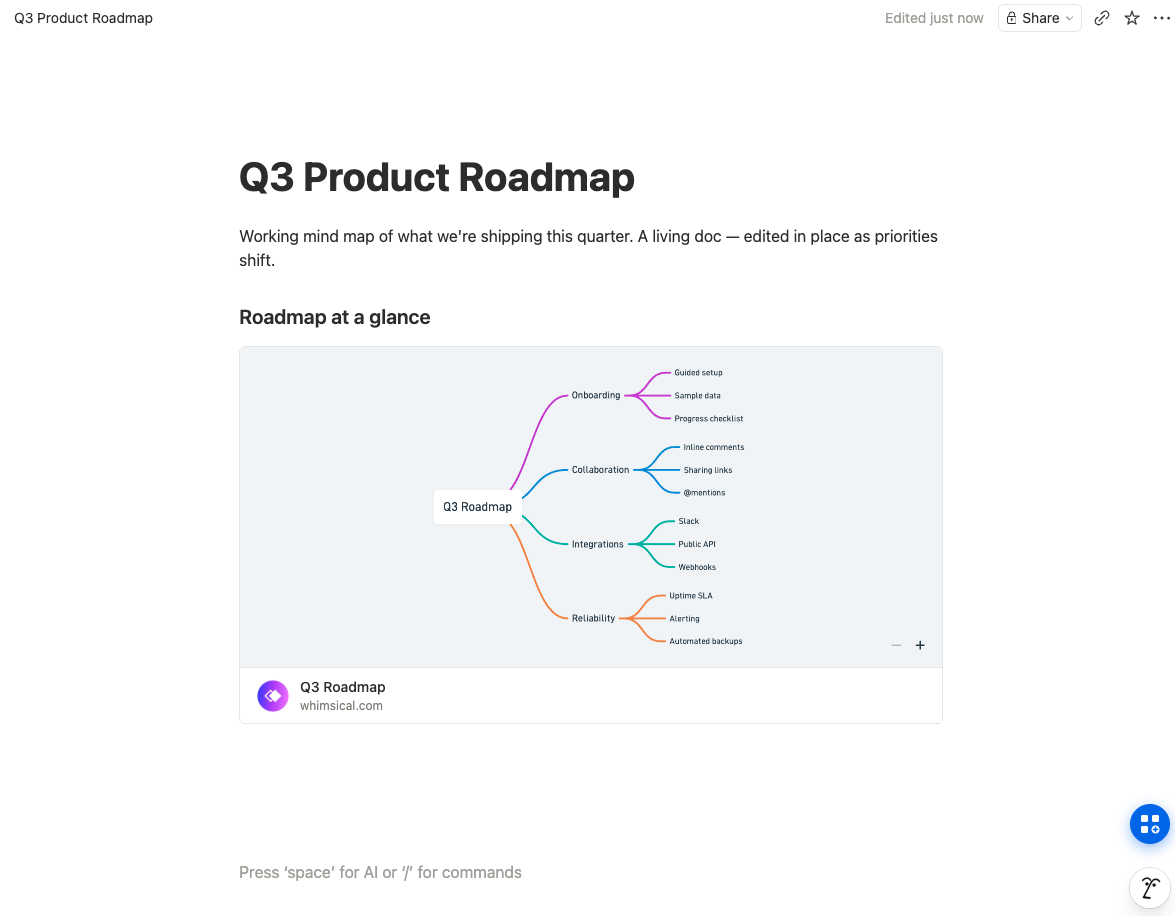
On integration, Whimsical is one of the better-behaved embeds in Notion: paste a Whimsical link, and the board renders live in an iframe that stays in sync without re-exporting. The free plan is reasonable for trying things (unlimited private files, 3 collaborative boards, 100 AI actions), and Pro at $10 per editor per month billed annually unlocks unlimited shared boards. For a product team that lives in a dedicated design-and-diagram app and treats Notion as one of several places the work shows up, Whimsical is a strong, well-made choice.
Where Whimsical strains for Notion-native work
The strain is the same architectural one every external app hits: the diagram lives in Whimsical, not in Notion. The embed is good, but it is still an embed. The board sits on whimsical.com, the iframe is an external dependency the page has to load, and editing always means hopping to Whimsical and back. If a teammate opens the Notion page without Whimsical access, or a share setting changes, the embed degrades. The diagram is adjacent to your documentation, never truly part of it.
There is also a subtler cost. Because the diagram is not Notion content, it does not behave like the rest of your page: you cannot search its text from Notion, it does not travel when you duplicate or move the page the way an image block does, and its permanence is tied to a second service's account and pricing. For diagrams that are genuinely documentation, the thing you want is for them to be as ordinary and durable as any other block on the page. An embed, however clean, is structurally the opposite of that.
How Flowblock approaches it differently
Flowblock is a Chrome extension that adds a drawing button to every Notion page. Click it, an Excalidraw or draw.io editor opens in a modal over the page, you draw, and Save to Notion writes the result into the page as a native image block, with the editable scene tucked inside the image so Edit reopens exactly what you made. Nothing is hosted on another service; the diagram is a normal Notion block in your workspace. That single architectural choice is the whole difference from Whimsical: not a better embed, but no embed at all.
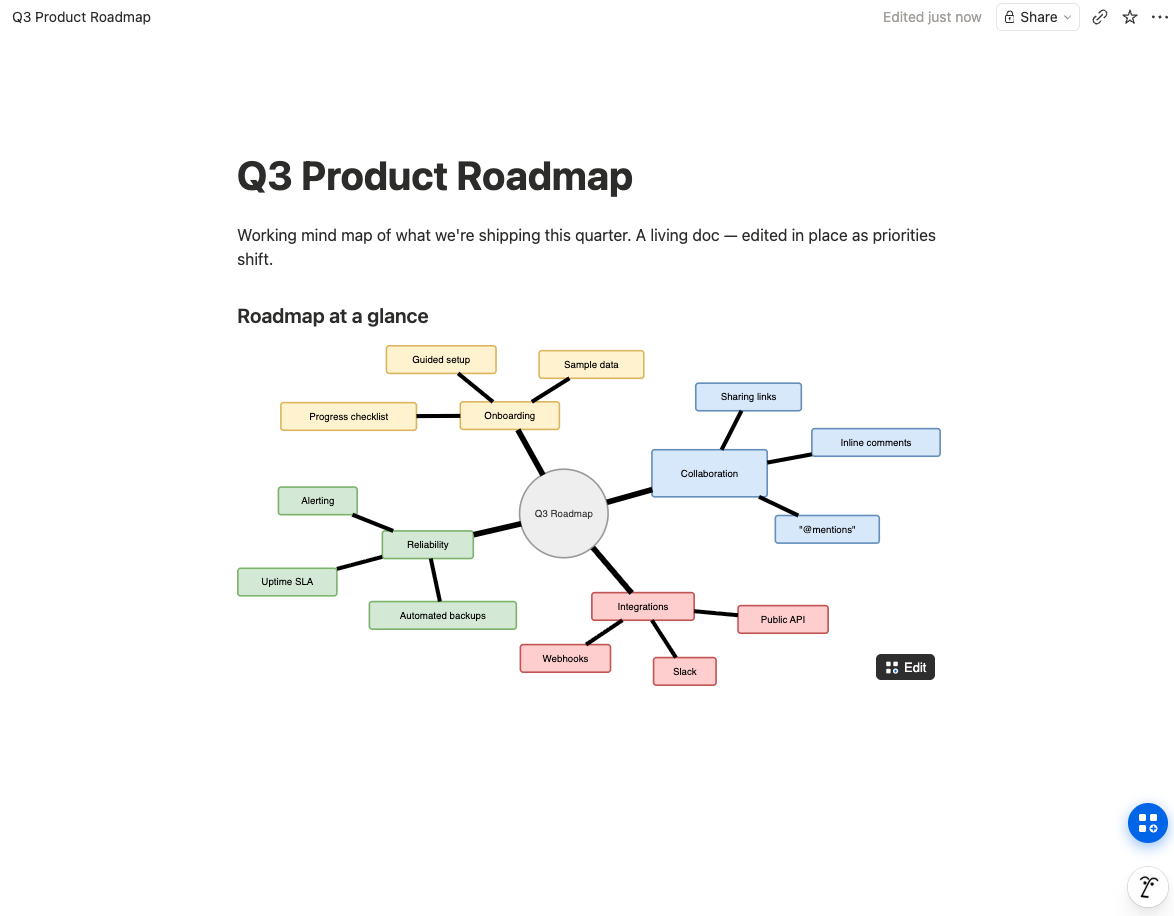
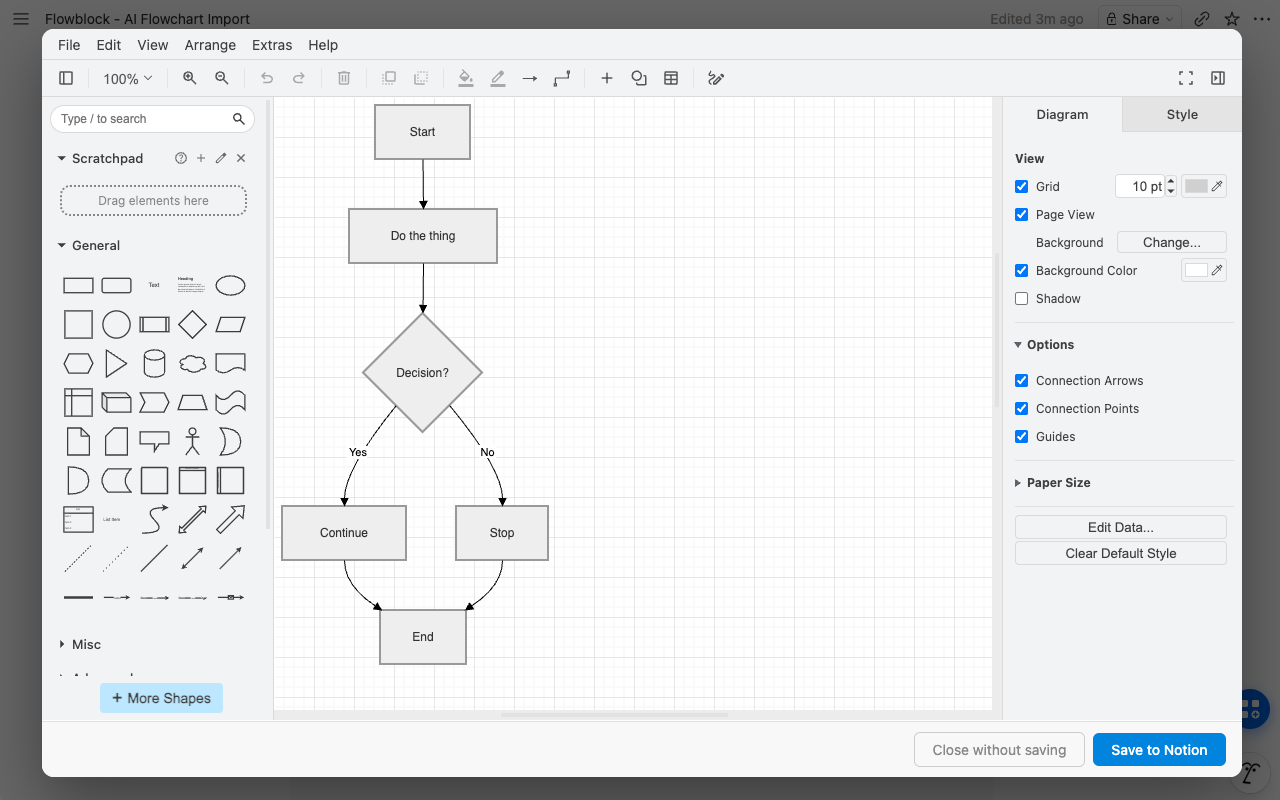
Where Flowblock leans hardest is the editing-existing-diagrams case. Its Import button turns any Notion Mermaid block, including the ones Notion AI generates, into an editable canvas in one click, so you fix layout and styling by hand instead of fighting syntax. And because Flowblock runs both Excalidraw and draw.io, it covers more structured territory than a sketch tool: draw.io brings full UML, BPMN, ERD, and cloud-architecture shape libraries. Try Flowblock free and the in-page editing model is clearer in one diagram than in any description.
 Try free
Side-by-side comparison
| Axis | Whimsical | Flowblock |
|---|---|---|
| Where the diagram lives | ❌ On whimsical.com, embedded into Notion | ✅ Inside Notion as a native image block |
| Notion embed quality | ✅ Clean live embed, stays in sync | ✅ No embed needed, it is a Notion block |
| Wireframes | ✅ Purpose-built component library | ⚠️ Sketch-style via Excalidraw / draw.io mockups |
| Mind maps | ✅ Dedicated keyboard-driven mode | ⚠️ Freeform canvas + Mermaid mindmap import |
| Structured diagrams (UML, BPMN, ERD) | ⚠️ Flowchart shapes, limited libraries | ✅ Full draw.io shape libraries |
| Real-time collaboration | ✅ Live multiplayer editing | ❌ Single-author, no co-editing |
| AI generation | ✅ Prompt to flowchart / mind map | ✅ Import + edit Notion AI's Mermaid output |
| Edit in place from the Notion page | ❌ Edit in Whimsical, embed refreshes | ✅ Hover, click Edit, reopen the canvas |
| Free tier | ⚠️ 3 collaborative boards, 100 AI actions | ⚠️ 5 new diagrams/month, editing unlimited |
| Price for 5 editors | ⚠️ ~$50/mo (Pro, $10/editor) | ✅ Free under the cap, else ~$18.75/mo total |
Read by row and the division is clear: Whimsical wins on dedicated editors (wireframes, mind maps), polish, and real-time collaboration; Flowblock wins on living inside Notion, structured-diagram breadth, in-place editing, and cost for solo maintainers. The honest summary is that Whimsical is the better app and Flowblock is the better fit for the specific job of keeping diagrams in your Notion docs. The same axis runs through the Miro alternative comparison too.
Free tier vs free tier, in specifics
The two free tiers are not comparable head to head, because they gate different things. Whimsical's free plan gives you unlimited private files but caps collaborative work at 3 boards and 100 AI actions, with 5 MB file uploads and 10 guest seats; the constraint bites when a team needs more than three shared boards. Flowblock's free tier caps new diagram creation at 5 per month and leaves editing unlimited, so the constraint bites when you draw many brand-new diagrams in a month, not when you maintain existing ones.
For a Notion user whose pattern is "make a diagram occasionally, edit the existing ones often", Flowblock's free tier is unusually forgiving: revisiting and updating a diagram never counts against the five. For a team that needs many people on many shared boards at once, Whimsical's paid plan is the more natural home and the free tier is just a trial. Match the tier to your actual rhythm rather than the headline number.
When to pick Whimsical
- Wireframes are a core deliverable. Whimsical's component-based wireframe library produces cleaner, faster mockups than Flowblock's sketch-style approach.
- You want dedicated, specialised editors. Its mind-map and flowchart modes are purpose-built and fast in a way a general canvas is not.
- Real-time collaboration matters. If several people edit one diagram at once, Whimsical supports that and Flowblock does not.
- The diagram app is a hub in its own right. If your team treats a diagramming app as a primary workspace and Notion as one destination among several, a polished standalone tool fits.
When to pick Flowblock
- Diagrams should be Notion content. Native image blocks search, duplicate, and travel with the page; embeds do not.
- You edit more than you create. In-place editing without leaving Notion is what keeps documentation diagrams current instead of drifting.
- You have Notion AI Mermaid to clean up. Flowblock's Import turns generated Mermaid into an editable canvas in one click, which Whimsical cannot do with Notion's blocks.
- You need structured types beyond flowcharts. draw.io's UML, BPMN, ERD, and architecture libraries go well past Whimsical's set. The wider trade-off map lives in the Notion diagram guide.
FAQ
Does Whimsical have a Notion integration?
Whimsical files embed into Notion through Notion's embed block: paste the Whimsical share link and the board renders live in an iframe, so it stays in sync without re-exporting. That is a real and fairly clean integration. The catch is the same one every embed has: the board lives on whimsical.com, editing happens in Whimsical, and the diagram is not native Notion content. Flowblock takes the other approach and saves the diagram as an actual Notion image block in your workspace.
Is Flowblock as good as Whimsical for wireframes?
No, and this is worth being honest about. Whimsical has a purpose-built wireframe library with real UI components: buttons, inputs, nav bars, device frames. Flowblock draws wireframes through Excalidraw, which is a hand-sketch aesthetic, and through draw.io's mockup shapes, which are more utilitarian. If polished, component-accurate wireframes are your main job, Whimsical is the better tool. If you want quick low-fidelity sketches that live in your Notion docs, Flowblock is enough.
Can Flowblock do mind maps like Whimsical?
Yes, though differently. Whimsical's mind map has an opinionated, keyboard-driven flow built specifically for branching outlines, and it is fast. Flowblock makes mind maps on the Excalidraw or draw.io canvas, which is freeform rather than a dedicated mind-map mode, and it also imports Mermaid mindmap syntax (including from Notion AI) into an editable canvas. You trade Whimsical's specialised speed for a diagram that lives natively in the Notion page.
What is the cost difference at 5 users?
Whimsical Pro is $10 per editor per month billed annually, so five editors is about $50 a month. Flowblock is $3.75 per user per month for unlimited diagrams, so five users is about $18.75 a month, and it is free entirely if each person stays under 5 new diagrams a month. The gap reflects what you are paying for: Whimsical's price buys real-time collaboration and its specialised editors, Flowblock's buys in-Notion editing for individual maintainers.
Can I edit Whimsical diagrams in Flowblock?
Not directly. Whimsical does not export to a format Flowblock reopens as editable objects, so there is no import path between the two. If a Whimsical diagram needs to become a maintained Notion diagram, you either export it from Whimsical as an image and upload it to Notion as a static picture, or redraw it on Flowblock's canvas so it stays editable in the page. There is no automated conversion, and we would rather say so than imply one exists.
Looking for setup, editor, or billing details? See the detailed FAQ →
Want your flowcharts and mind maps to live inside Notion, not embedded from another app?
Flowblock opens an Excalidraw or draw.io canvas on the Notion page, saves your diagram as a native image block, and reopens it for editing whenever the work changes.
Try Flowblock - free